For tiffin services
Your whole round, in one app
Customers, menus, deliveries and dues, sorted every day.
Short answer
How do I manage a daily tiffin service?
Keep every customer, menu, delivery and payment in one place. HomeTiffin counts each day's boxes from your customers' answers, takes out leaves and pauses, splits lunch and dinner rounds and keeps your dues list. Customers answer, pause and order on links, so you stop answering the same messages all day.
A day with HomeTiffin
A day on the round
Night before
Share tomorrow's menu. Customers tap Yes or Skip, and the Tomorrow card fills up.
Morning
Cook from one number, lunch and dinner split, leaves taken out.
Delivery
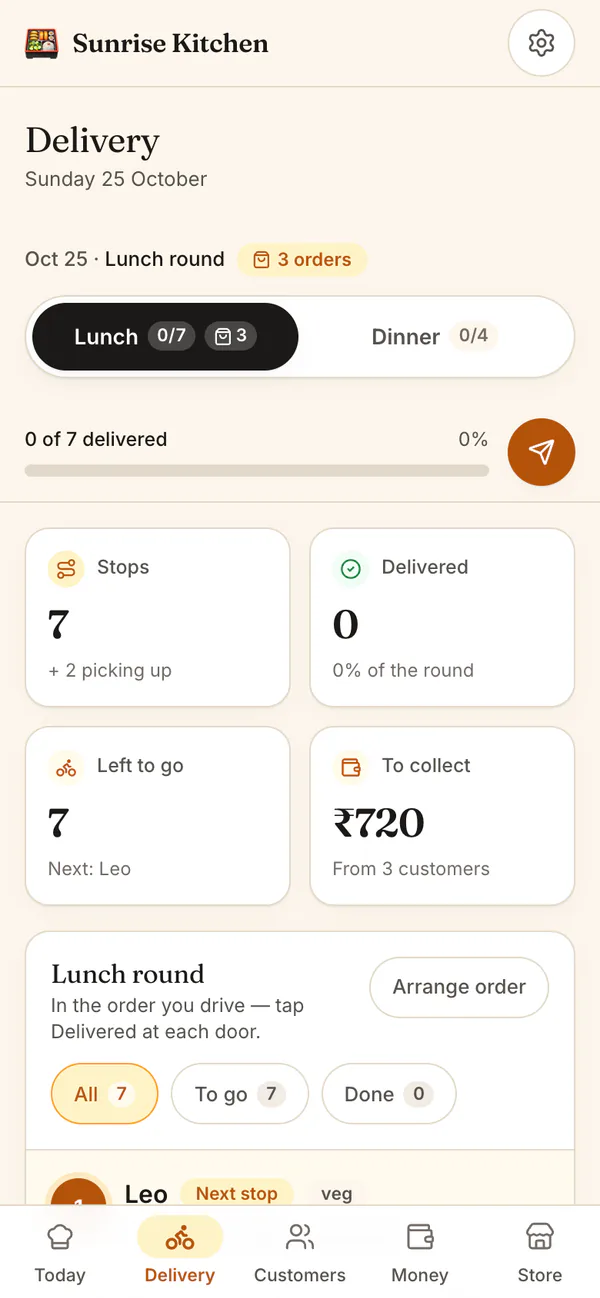
Send the lunch round to your driver's link. They tick each door as they go.
Month end
Dues lists who owes, biggest first. Remind them politely from your WhatsApp.
Tiffin services
Common questions
How do I move my customers from a notebook?
Add each customer once with their meals, price and address; it takes about 20 seconds each. In the updated phone app you can also import a list from a CSV file or your phone's contacts. After that, the daily count keeps itself.
What if I have more customers than the Free plan allows?
The Free plan covers up to 5 monthly customers. Paid plans cover 15, 30 and no limit, and one-off orders are never limited. Every new kitchen also starts with 7 days of everything. The pricing page shows prices where you are.
Can customers who pick up be left off the round?
Yes. Set a customer to Picks up themselves. They are listed under Pickup instead of on the drive, still counted every day, and you tap Picked up when they collect.
Start your kitchen today
Free to start. No card. Set up in minutes.
More for Tiffin services
What a tiffin service app should do
A tiffin service runs on four lists: who eats today, what you cook, where it goes and who has paid. HomeTiffin keeps all four, linked, so a leave marked in the morning changes the count, the round and nothing else.
- Daily tiffin: monthly and per-box customers, lunch and dinner.
- Weekly menu: write the week once, share one link.
- Delivery rounds: separate lunch and dinner rounds, and a driver link.
Fewer messages, fewer mistakes
Answers, pauses and one-off orders come in through links, not chats. Read how to handle pauses and leaves for fair rules, and how to collect tiffin payments on time for the money side.
Lunch and dinner, kept apart
If you cook both meals, each customer can take lunch, dinner or both. Delivery shows a separate round for each meal, and the driver link has the same switch. Someone who takes both meals is a stop on each round, so nothing goes out at the wrong time.