Today and tomorrow
Two days, two clear answers
Customers say yes or skip. Your count fills itself.
Short answer
How do customers confirm tomorrow's tiffin?
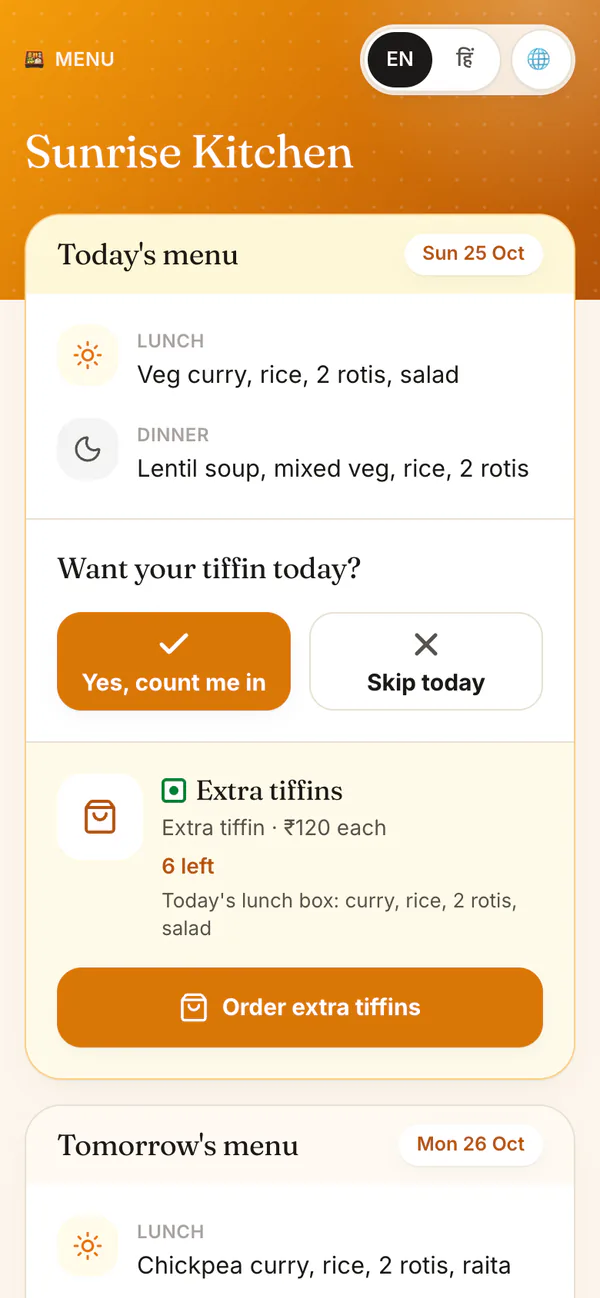
Share one menu link. Customers see a Today card and a Tomorrow card, enter their phone once, and tap Yes or Skip for each day. HomeTiffin adds every answer to that day's cook count. You can also sell a set number of extra tiffins for either day.
What you get
- Yes or SkipOne tap per day, no app.
- Extra tiffinsSay how many. Stops when sold out.
- Tomorrow cardSee tomorrow's count the night before.
How it works
From link to count
Post the day's menu
Pick Today or Tomorrow in Menu & share. From 6 pm your kitchen's time, it opens on Tomorrow.
Share one link
Send it to your WhatsApp group, broadcast list or status. Customers answer each day on its own.
Watch the count
Answers roll into that day's count, split into lunch and dinner. Tomorrow's move to Today at midnight.
Sell a few extras
Set how many extra tiffins you can make, and the price. Orders stop when they are gone.
Today and tomorrow
Common questions
What happens when someone I don't know orders from the link?
A phone number you have not saved becomes a one-off order for that day, with your walk-in price if you set one. It gets an order number, and the customer can cancel it with Skip as long as it is not delivered or paid.
Can I stop same-day orders after a certain time?
Yes. In Order rules, set Last orders for today, for example 10:00. After that time the page says orders for today are closed and offers tomorrow instead. Tomorrow's orders stay open until midnight.
Can I check each order before it counts?
Yes. Turn on I confirm each order myself. New extra-tiffin orders then wait under Needs your OK and only count once you confirm them. Left off, orders are confirmed as they come in.
Whose clock decides today and tomorrow?
Your kitchen's. Today and tomorrow follow your kitchen's time zone, never the customer's phone, so a late-night answer for tomorrow always lands on the right day.
Start your kitchen today
Free to start. No card. Set up in minutes.
More about Today and tomorrow
How a daily tiffin order link saves your morning
Instead of asking a dozen chats who wants food today, you post one link. Each customer answers for today and tomorrow on their own, and tapping again only changes their answer: it never adds a second box.
A customer on leave is told so if they tap Yes for a day they are away, and a customer you stopped is asked to contact you. Nothing is counted twice.
Extra tiffins for people who are not regular customers
Made a few more boxes than your customers need? Say how many extra tiffins you can make today and tomorrow, add a photo, the veg or non-veg mark and the price. Anyone with your link or your kitchen page can order until they are gone, and every order gets a tracking page.
Rules that keep extra orders under control
Set a last time for same-day orders, and turn on I confirm each order myself if you want to see every order before it counts. When a day is sold out, the link says so, and nobody can order more than you said you could make.