Your kitchen page
One link for everything you sell
Share it on WhatsApp or as a QR code.
Short answer
Do I need a website for my tiffin business?
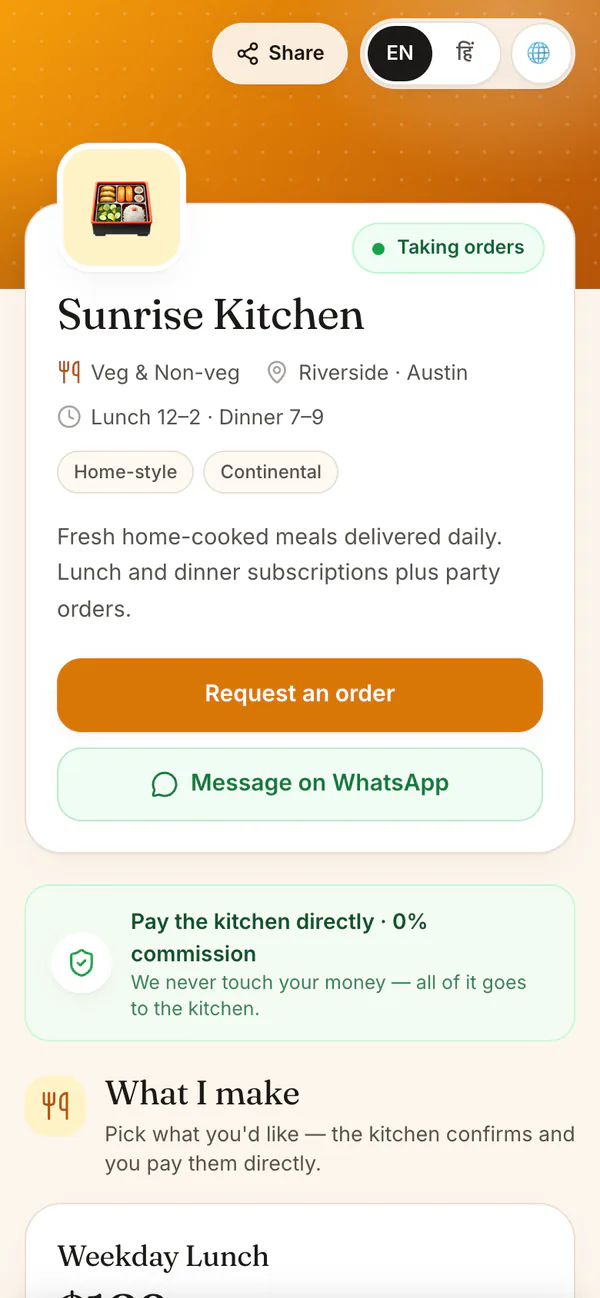
Not a separate one. HomeTiffin gives your kitchen its own page, like hometiffin.app/k/your-kitchen, with your plans, weekly menu, timings and big order buttons. Customers open it in any phone browser and order in a few taps. They pay you directly, and you pay 0% commission.
What you get
- Big order buttonsMonthly tiffin, today, shop, cakes.
- Hindi or EnglishCustomers switch the page language.
- Branded linkYour name in the link, Pro and up.
How it works
Live in a few minutes
Fill in your page
Add a photo, a few words, your area, timings and WhatsApp number. A meter shows what to add next.
Add plans and menu
List your plans with meals, days and price, and fill in your weekly menu.
Switch on Published
Your page goes live. Turn off new subscribers whenever your kitchen is full.
Share the link
Copy it, share it on WhatsApp, or print the QR code for your door or building.
Your kitchen page
Common questions
What can customers do on my kitchen page?
Depending on what you sell, they can ask to start a monthly tiffin, order tiffin for today or tomorrow, buy from your shop, or request a cake or party food. Each order gets a number and a ready WhatsApp message to send you.
Can I stop new subscribers when I am full?
Yes. Turn off Accepting new subscribers in Share & link. Your page stays up for your regular customers, and you can turn it back on when you have room again.
Will my link change if I rename it later?
Your kitchen also has a permanent link that never changes. If you change a branded link later, old links and printed QR codes with the old name stop working, so print the permanent link if you never want to reprint.
Start your kitchen today
Free to start. No card. Set up in minutes.
More about Your kitchen page
A simple website for a home kitchen
Your kitchen page works like a small website: your name and photo, a few words about your food, your area and timings, your plans and this week's menu. See a sample kitchen page to get a feel for it.
A big button appears for each thing you sell, only when there is something behind it. A kitchen that only sells monthly tiffin keeps a simple page.
How orders from your page reach you
When someone orders, they get an order number, a tracking page and a button that sends the order to your WhatsApp. It also lands in your app. A published page is listed in the kitchen directory too.
Plans, timings and your area
Add each plan you offer with its meals, days, price, and whether it is delivery or pickup. Add your area, city and timings, and pin your location on the map. A meter tells you how ready your page is, and a preview shows exactly what customers will see.