For mess kitchens
Know the headcount before cooking
Residents say yes or skip. Leaves come off.
Short answer
How do I count meals for a PG mess?
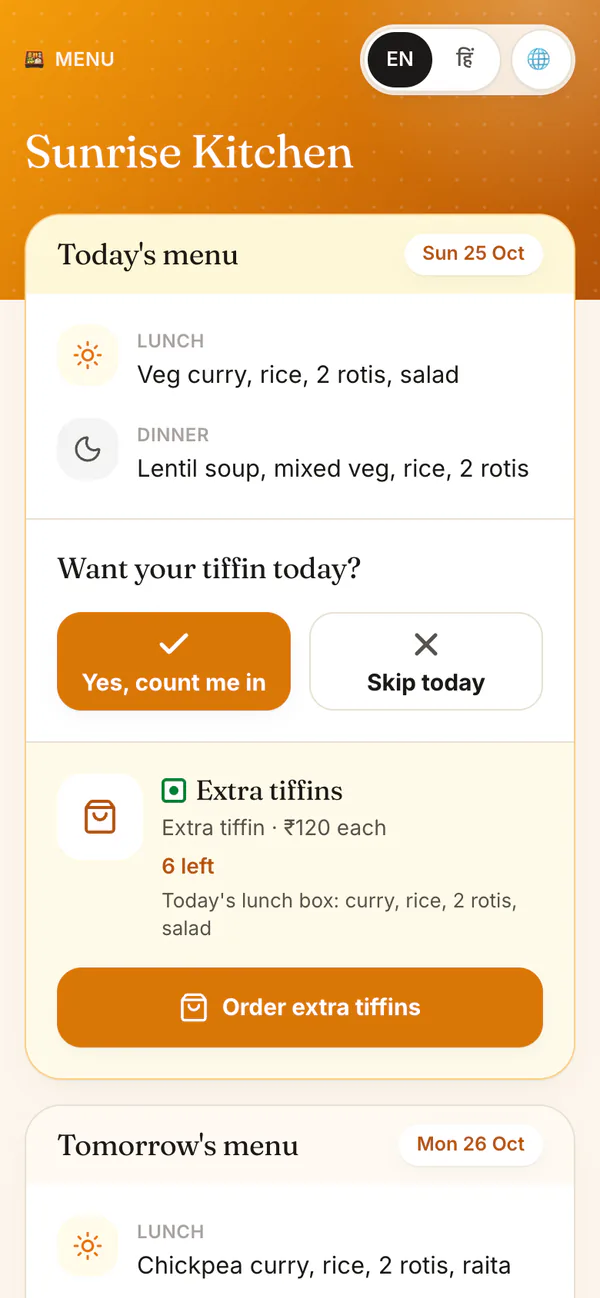
Add each resident once as a monthly customer with lunch, dinner or both. They answer Yes or Skip on one link and set their own leave dates. HomeTiffin turns that into one count for each meal, so you cook closer to what is eaten, and tracks monthly dues.
A day with HomeTiffin
A month in the mess
Add residents
Name, phone, meals and monthly price. Someone who joins mid-month can pay only for the days left.
Share the link
Post the menu link in your residents' group. They tap Yes or Skip each day.
Cook to the count
Today shows lunch and dinner numbers with leaves already taken out.
Collect at month end
Dues lists who owes. Record cash, UPI or bank payments in a tap.
Hostel and PG mess
Common questions
Residents eat at the mess. Do I need delivery?
No. Set residents to Picks up themselves and they stay off the delivery round. They still count in each day's number, and you can tick them as picked up if you want a record.
How many residents can I add?
The Free plan covers up to 5 monthly customers, and paid plans cover 15, 30 and no limit. Every new kitchen starts with 7 days of everything. The pricing page shows plan sizes and prices where you are.
What if a resident leaves the PG?
Tap Stop service. They leave the count, but their history and anything they owe stay in dues, marked Stopped, until they pay or you let it go. Start again brings them back if they return.
Start your kitchen today
Free to start. No card. Set up in minutes.
More for Hostel and PG mess
Mess management without the register
In a hostel or PG mess, the hard part is knowing how many will eat. Residents skip meals, go home for the weekend or join halfway through the month. HomeTiffin collects their answers on one link, takes leaves off by itself and gives you one number for lunch and one for dinner.
Residents set their own leave dates with a pause link, so you are not keeping a list on the wall.
Monthly mess fees and dues
Each resident's monthly fee goes onto your dues list until it is paid, month after month. Record payments in a tap and send a polite reminder from your WhatsApp. See payments and dues and how to keep records for your tiffin business.
Residents who join or leave mid-month
When someone joins after the 1st, choose a full first month or only the days left. When someone leaves, tap Stop service: their fee counts up to the month you stopped them, and anything they owe stays on your list until it is settled.