Order tracking
Customers check. You keep cooking.
Every order gets a number and its own page.
Short answer
How can customers check their order status?
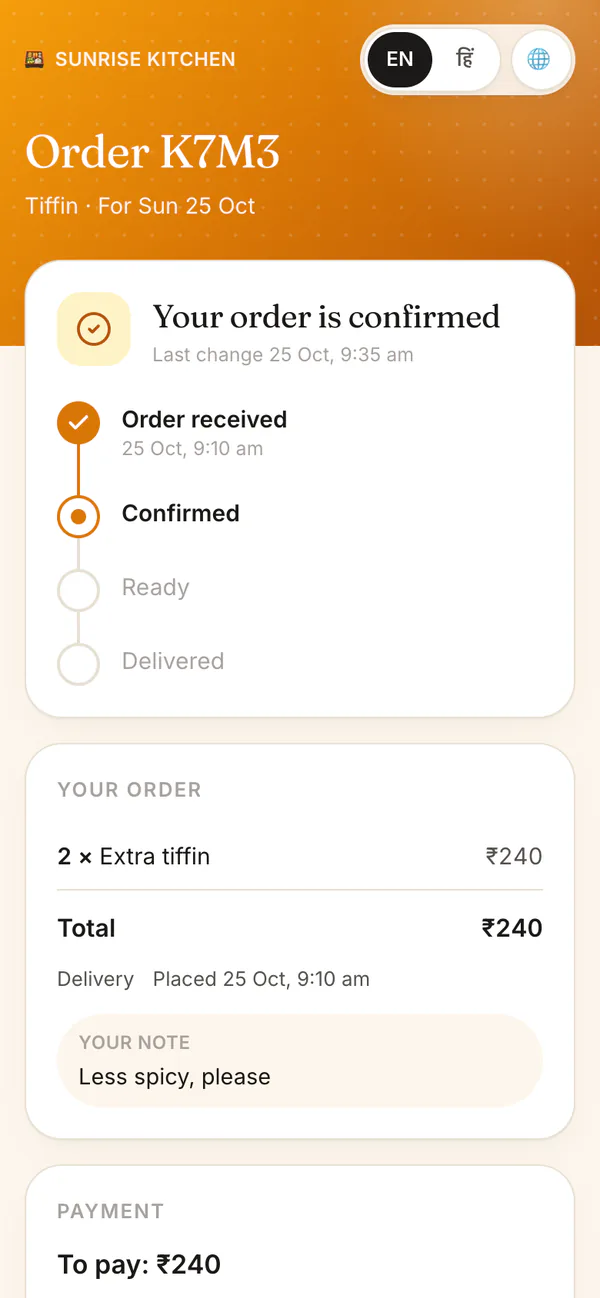
Every order from your page gets a short number, like A7K2, and a Track your order link. The customer types the last 4 digits of their phone to open it, then sees four steps: received, confirmed, ready, delivered or collected. HomeTiffin updates it as you work.
What you get
- Four clear stepsReceived, confirmed, ready, delivered.
- Left to payPaid in full, or the balance.
- Questions to WhatsAppOne button with the order number.
How it works
Nothing for you to set up
They order
From your page or your menu link. They get a number and a tracking link.
They open it safely
The phone number they ordered with unlocks it. Guessing is stopped after a few wrong tries.
You move the order
Confirm, Packed, Handed over: the page follows each tap you make.
Changes are shown
If you only had 4 of the 6 they asked for, the page shows what changed. No surprises at the door.
Order tracking
Common questions
Can anyone open another person's order?
No. The link does not carry the phone number. To open an order, the customer types the phone number they ordered with, and guessing is stopped after a few wrong tries.
What does the customer see if I decline an order?
The order page says it was declined or cancelled, and for made-to-order requests it shows the reason you picked. It still offers the WhatsApp button, so they can message you if they have a question.
Do I have to set anything up for order tracking?
No. Every order from your page or your menu link gets its number and tracking page by itself. You can also send a customer the link yourself, straight from the order.
Start your kitchen today
Free to start. No card. Set up in minutes.
More about Order tracking
Why an order tracking page helps a small kitchen
Every "is it ready?" message takes you away from the stove. With a tracking page, customers see for themselves where their order is, what they ordered, the total and what is left to pay. The page checks for changes by itself every half minute.
Tracking works for every order from your page: extra tiffins for today or tomorrow, shop orders and made-to-order requests. Customers can read it in Hindi or English.
Money stays between you and your customer
The page shows what is left to pay, but HomeTiffin takes no payment. Customers pay you directly, and you mark it in the app (see payments and dues). Orders come from your kitchen page, your shop and your made-to-order showroom.
When an order changes
Sometimes you cannot make the full order. When you trim it, the tracking page shows what changed and the new total, so the customer knows before you reach the door. If you decline or cancel, the page says so and keeps a button to message you.