Pause and leave
Customers pause. You cook.
A private link for each customer to skip days.
Short answer
How do tiffin customers pause their meals?
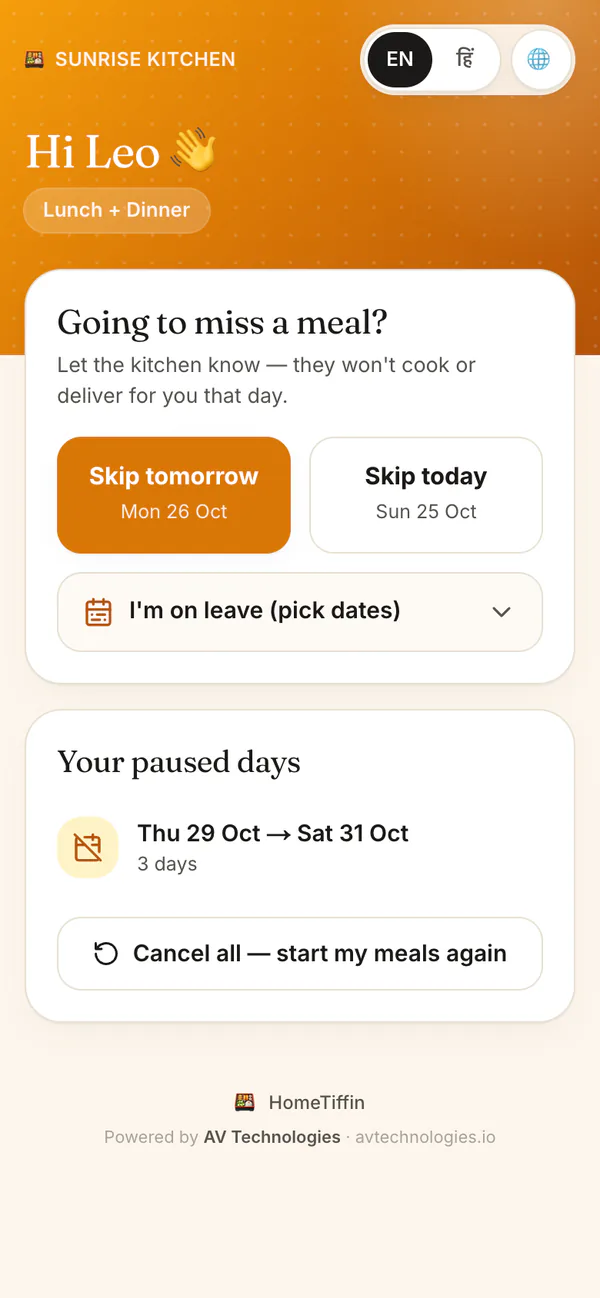
Send each customer their own pause link on WhatsApp. From it they can skip today, skip tomorrow or set leave dates, with no app and no call to you. HomeTiffin takes those days out of your cook count. You can also mark a leave for them yourself.
What you get
- Private pause linkOne personal link for each customer.
- Leave datesAway a week? They pick dates.
- Who paused whatSee paused by customer or by you.
How it works
Pauses without phone calls
Open the customer
In Customers, tap their name, then Leave & pause.
Send their link
Tap Send pause link on WhatsApp. It opens a message from your own number.
They skip or go away
They tap Skip today, Skip tomorrow, or pick leave dates. Those days leave your count.
Check what is coming
Leave coming up lists every planned leave. Tap Cancel on one to put them back in.
Pause and leave
Common questions
Can a customer on leave still order for today?
Yes. Leave is checked for the day they answer. Someone whose leave starts tomorrow can still say yes for today, and is told they are on leave if they tap Yes for tomorrow.
Are skipped days taken off the monthly bill?
No. The monthly fee stays as you set it: skipped days leave your cook count, not the bill. If you agree to take less for a long leave, record what they pay and waive the rest in Money.
Does the customer need an account to pause?
No. The pause link opens in any phone browser. There is nothing to install and nothing to sign in to, so even customers who are not good with phones can use it.
Start your kitchen today
Free to start. No card. Set up in minutes.
More about Pause and leave
Why pause links keep your tiffin count right
Most counting mistakes in a tiffin business come from leaves told by phone call and forgotten by morning. With a pause link, the customer sets the days themselves, and the count you cook from already knows.
In Leave coming up, leaves a customer set show as Paused by the customer, and leaves you marked show as Marked by you. Either kind can be cancelled.
Setting fair rules for leaves
Decide your rule before the first long leave: do you carry days over, give money back, or neither? Our guide on how to handle pauses and leaves has simple rules other cooks use. Whatever you agree, payments and dues keeps the money side straight.
Marking a leave yourself
Some customers will still call, and that is fine. Open their name, tap Mark leave, pick the dates and tap Save leave. The count changes the same way as when they use their own link. A customer who stops for good is different: tap Stop service, and their history and dues stay.