Reports and downloads
Your numbers, always yours
Profit each month. Every list as a spreadsheet.
Short answer
How do I keep records of my tiffin business?
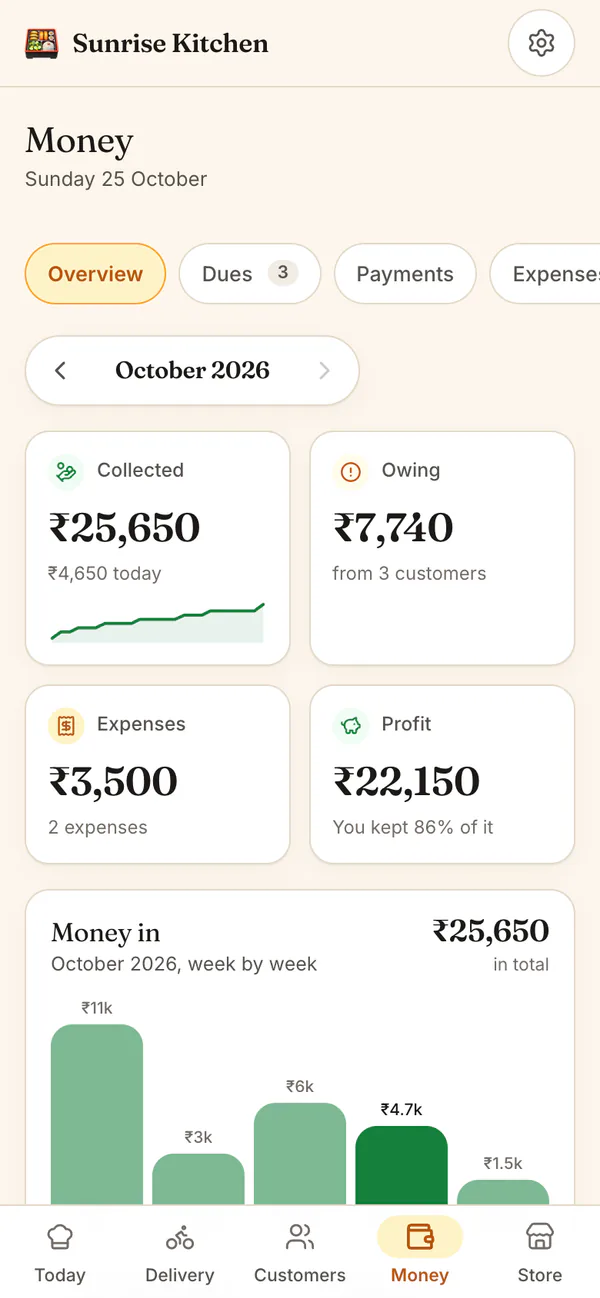
HomeTiffin keeps your records as you work: payments, dues, orders, deliveries and expenses. Money shows what you collected, spent and kept each month. On the web, Download my data saves your customers, payments, orders and more as spreadsheet files you can open anywhere.
What you get
- Profit each monthCollected minus spent, month by month.
- Sales trendsBusiest days and slow payers, on Growth.
- Download everythingSpreadsheet files, whenever you want.
How it works
From records to files
Work as usual
Mark deliveries, record payments and add expenses. Your records build up by themselves.
Check the month
Money shows Collected, Owing, Expenses and Profit. Arrows show earlier months.
Look at trends
Analytics compares any stretch, from 7 days to 12 months, with the one before it.
Download your data
Open HomeTiffin in a web browser, go to Settings, then tap Download my data.
Reports and downloads
Common questions
Can I download my data inside the phone app?
Downloads do not work inside the phone app. Open HomeTiffin in your phone's web browser or on a laptop, go to Settings, and tap Download my data there. Each list saves as its own spreadsheet file.
Which lists can I download?
Customers, payments, orders, order items, daily records and expenses. If you sell from a shop or take made-to-order requests, you also get your items, daily portions and stock, full order details and the days you are closed.
Is my downloaded data sent anywhere?
No. The files are made on your own phone or laptop and saved there. Nothing is sent anywhere. Customer names and notes can come from your public order form, so share the files with care.
Which plans include Analytics?
Analytics is part of the Growth plan and above, and of every 7-day free trial. On other plans the tab shows a preview. Profit, dues and data downloads are there on the Free plan too, which covers up to 5 monthly customers.
Start your kitchen today
Free to start. No card. Set up in minutes.
More about Reports and downloads
What records a tiffin business should keep
Who you served, what they owe, what they paid and what you spent: with those four lists you can answer almost any question about your kitchen. HomeTiffin builds them as you tap Delivered, Mark paid and Add an expense.
Our guide on how to keep records for your tiffin business explains what to note every day, week and month.
Your data is yours
You can take everything out as spreadsheet files whenever you like, on any plan. The expense list for a month also has its own CSV button on the web. See payments and dues for how the money numbers are counted, and pricing for what each plan includes.
Analytics on the Growth plan
Analytics looks across weeks and months: sales, money collected, boxes delivered, lunch against dinner, your busiest days, your top customers and who has waited longest to pay. It comes with the Growth plan and above, and with every free trial. Other plans see a preview.