For home bakers
Every cake order, on the calendar
Notice, sizes, advances and closed days, all sorted.
Short answer
How do home bakers manage cake orders?
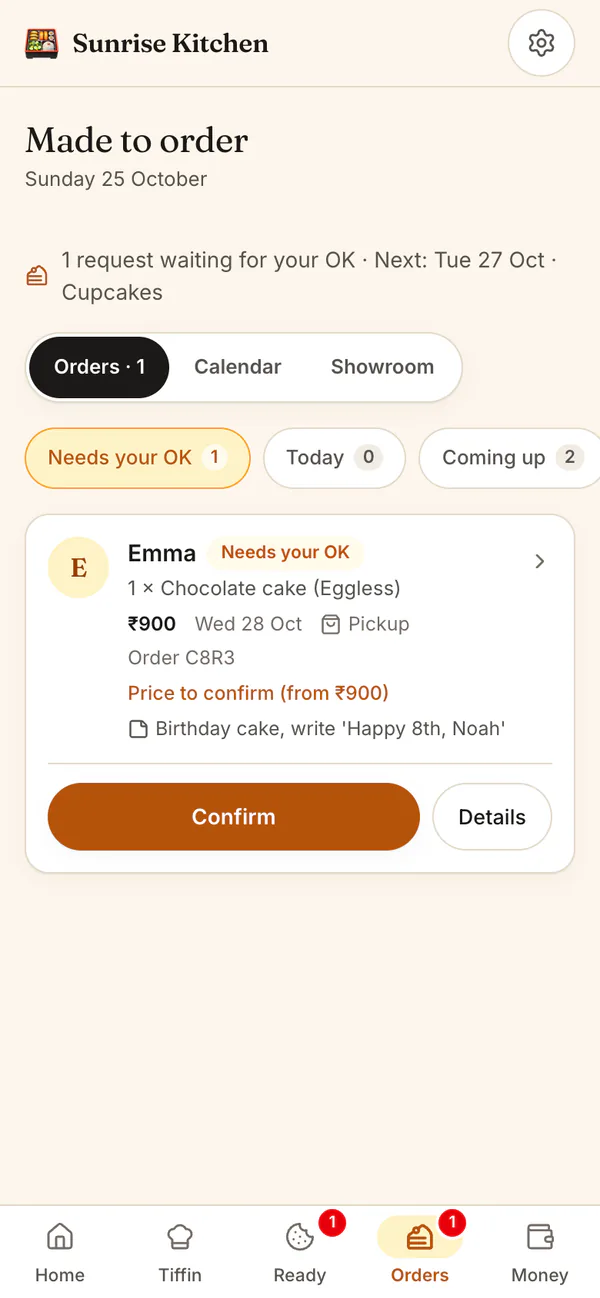
List your cakes and boxes with a photo, a starting price, sizes, flavours and the notice you need. Customers pick a date that fits and send a request. In HomeTiffin you confirm the final price, ask for an advance and see each day's orders on a calendar.
A day with HomeTiffin
A cake order, start to finish
Request comes in
Size, flavour, date needed and a note such as Happy Birthday Mia.
Confirm, ask an advance
Type the final price, tap 25% or 50% for the advance, and tell them on WhatsApp.
Bake and tell them
Tap Packed, then send the ready message that it is done, with the balance.
Hand over, get paid
Tap Handed over. The balance shows in Who owes me until you tap Got paid.
Home bakers
Common questions
Can I mark a cake as eggless?
Yes. Mark each item Veg, Egg or Non-veg, and add an allergen note such as contains nuts. Customers see the mark on your page before they order, and you see it on every request.
Can I offer sizes and flavours?
Yes. Type the choices separated by commas, for example 0.5 kg, 1 kg, 2 kg and Chocolate, Vanilla. The customer picks one of each, and you see their choice on the order.
Do I have to take every cake request?
No. Every request waits for your OK. You can confirm it with a price, ask a question on WhatsApp, or decline with a reason such as Fully booked that day. The reason shows on their order page.
Start your kitchen today
Free to start. No card. Set up in minutes.
More for Home bakers
Running a home bakery from your phone
Home bakery orders need dates, sizes and advances, and they pile up around festivals and weekends. HomeTiffin keeps each request with its date, size, flavour and note, and limits how many you take in a day if you want.
Already-baked brownies and cookies sell from your shop, and custom cakes from your made-to-order showroom. Switch either on in Settings, under What you sell.
Advances, balances and holidays
Ask for an advance with one tap, mark it received, and the balance waits in your dues until you are paid. Going away? Close those days and customers cannot pick them. Read how to take orders for cakes and party food for simple rules.
Limits for busy days
Set Most per day on an item, for example 2 cakes, and a full day is crossed out on your page. Notice from same day up to 7 days stops rush orders you cannot make, and a minimum order keeps small boxes worth your time.