Hindi and English
Use it in your language
Hindi or English, for you and your customers.
Short answer
Is there a tiffin app in Hindi?
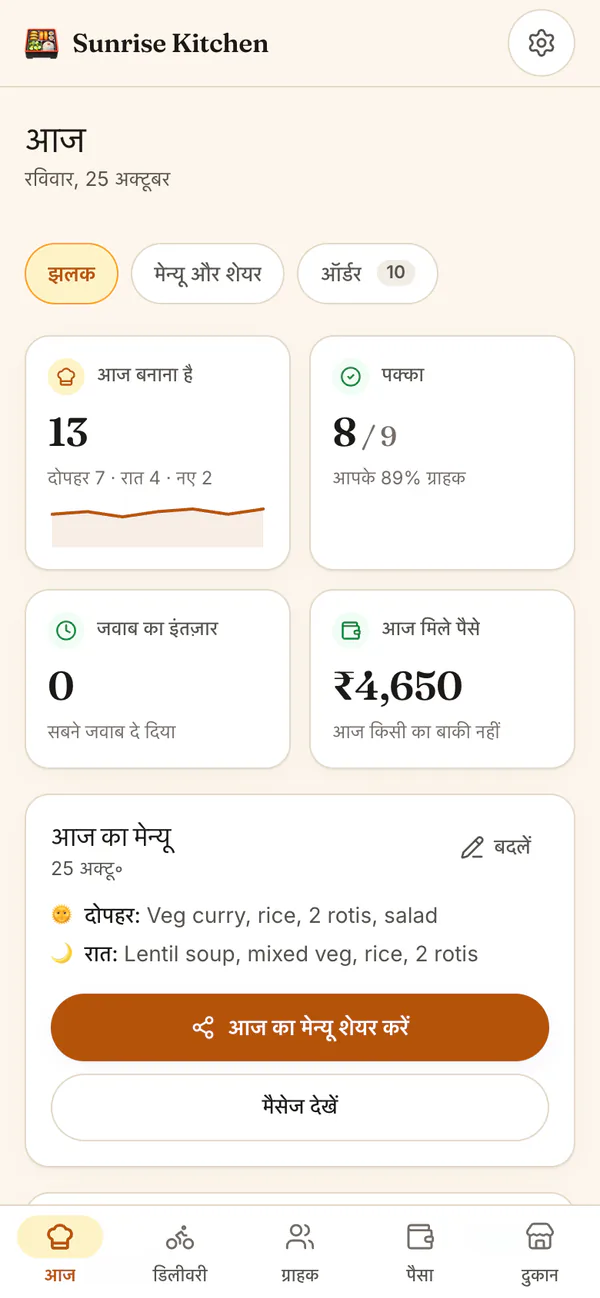
Yes. HomeTiffin works fully in Hindi and in English. Tap हिं or EN to switch, and your phone remembers it. Your kitchen page, menu link and order pages have their own language button, so each customer picks their own. Your records stay the same in both.
What you get
- Switch any timeTap हिं or EN. Nothing is lost.
- Menus in HindiShared menus follow your language.
- Customers choose tooYour page has its own button.
How it works
Switch in one tap
Pick at sign-in
Tap हिं on the sign-in card. Your new kitchen then starts in Hindi.
Change in Settings
Open Settings, then Language: EN or हिं. Your customers' pages are not affected.
Share in your language
Menu messages you share are written in the language you use the app in.
Customers pick theirs
On your kitchen page, customers tap the language button at the top.
Hindi and English
Common questions
Will names typed in Hindi show correctly?
Yes. You can type customer names, menus and notes in Hindi or English. They show the same in the app, and they open correctly when you download your data as spreadsheet files.
Does the app open in Hindi by itself?
A phone set to Hindi opens HomeTiffin in Hindi by itself. You can switch any time with हिं or EN, and your phone or laptop remembers your choice.
Do my customers see the app in my language?
Your kitchen page, menu link, pause link and order page each have their own language button, so every customer chooses for themselves. The menu messages you share follow the language you use the app in.
Start your kitchen today
Free to start. No card. Set up in minutes.
More about Hindi and English
A tiffin business app in Hindi, in plain words
Many home cooks are more at ease in Hindi. HomeTiffin uses everyday words in both languages: ग्राहक for customer, बाकी for what is still owed, पक्का for confirmed. The same kitchen works in both, so a family can share it even if one person likes Hindi and another English.
Your own app switches between EN and हिं at any time, and your choice is remembered on that phone or laptop. Buttons stay short, so they fit a small phone screen in either language. The help guides for the app have Hindi versions for several tasks too.
Hindi pages on this site
Prefer reading in Hindi? See HomeTiffin in Hindi. New to the app? Start with your kitchen page and the weekly menu.
Hindi on your customers' pages
Customers have their own language button on your kitchen page, your daily menu link, their pause link and the order tracking page. Each person picks Hindi or English for themselves, and their choice never changes your app or your records.